
Free APK • Android 5.0 and above • Installs in about a minute • 18+ only.
Login & Access
PK365 Login Guide: Password, Code and Quick Login
Two sign-in modes sit on the same PK365 screen, and most login problems are solved by switching between them. Here is each route, the exact number format, and a fix for every error.
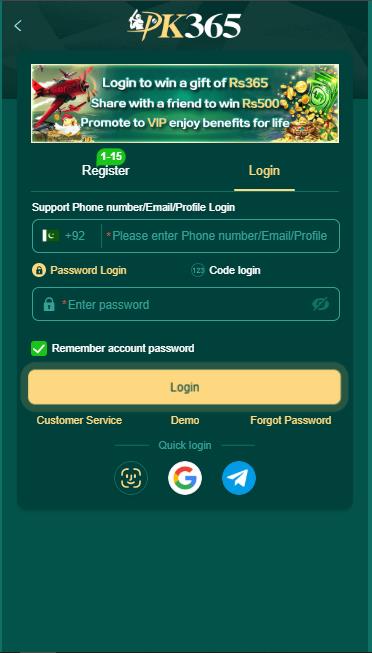
PK365 puts two sign-in modes on the same screen. Password Login takes your phone number, email or profile plus a password. Code login skips the password entirely and sends a one-time code to your number. Underneath sit quick-login buttons for biometric, Google and Telegram, and a Demo link that opens the lobby without an account at all. Most PK365 login problems are solved by switching mode rather than by resetting anything.
How PK365 Login Works
The top field accepts a phone number, an email address or a profile ID — the app labels it “Support Phone number/Email/Profile Login”. The country selector defaults to +92 for Pakistan. Below that, a two-way toggle switches between password and code entry, and a Remember account password checkbox keeps you signed in on a trusted handset.
This two-mode layout is becoming the norm for Pakistani gaming apps rather than a PK365 invention — 6666W handles sign-in much the same way — so the habits carry over if you use more than one platform.
| Route | What you need | Best for |
|---|---|---|
| Password Login | Number, email or profile plus your password | Everyday sign-in |
| Code login | The SIM in the phone to receive an SMS | Forgotten password, or a first sign-in on a new handset |
| Biometric quick login | Fingerprint or face already enrolled on the device | Fastest repeat access on your own phone |
| Google or Telegram | An account already bound in your profile | A backup when the SIM is unavailable |
| Demo | Nothing at all | Looking around before you register |
Signing In Step by Step
- Open PK365 and select the Login tab — the screen opens on Register for new installs.
- Leave the country selector on +92. Do not type +92 again in the field itself; that double prefix is the most common format error.
- Enter your number as 03XXXXXXXXX with no spaces or dashes, or type the email or profile ID bound to the account.
- Keep the toggle on Password Login and enter your password, tapping the eye icon to check it before submitting.
- Tick Remember account password only on a phone that is yours alone.
- Tap Login. The lobby loads with your balance in the top bar.
A lobby showing 0.00 is a successful login, not a failure. It means the account is fine and simply has no funds in it yet.
Using Code Login Instead
Switching the toggle to Code login replaces the password field with a one-time code sent by SMS. This is the route to use the moment a password stops working — it is faster than a reset and it does not change your credentials.
- Request the code when you are ready to type it. Codes expire.
- Tapping the request button repeatedly triggers a cooldown of roughly ten minutes. Wait it out rather than tapping again.
- A VPN is the most common reason an SMS never arrives. Turn it off completely rather than switching server.
- The code is only ever typed into the PK365 app. No legitimate person or page will ever ask you for it.
Quick Login and Bound Accounts
Beneath the main button, a Quick login row offers biometric, Google and Telegram. These are shortcuts to an existing account rather than separate accounts — you bind them from your profile after signing in normally once.
- Sign in with your number and password.
- Open Profile from the bottom navigation bar and find the account or security section.
- Bind Google or Telegram, and enable biometric unlock if your handset supports it.
- Test the bound route once by signing out and back in, while you still have working access through the original one.
Bind a second route today, not on the day you need it. Every account-recovery story that ends badly starts with someone having exactly one way in and then losing the SIM, the phone or the password.
Demo Mode
The login screen carries a Demo link alongside Customer Service and Forgot Password. It opens the lobby without an account, which makes it the cheapest possible way to see how the games are laid out and how the stake controls behave before you commit a number, a password or any money. If you are unsure about the app, start there. The login banner shown above Demo also advertises the welcome gift — what that actually pays, and what has to happen before you can withdraw it, is covered in the bonus and referral guide.
Resetting a Forgotten Password
- Tap Forgot Password on the login screen.
- Enter the registered number with the selector left on +92.
- Enter the verification code that arrives by SMS.
- Set a new password — one you do not use on any wallet, email or banking app.
- If the code does not arrive, sign in with Code login first and change the password from your profile once you are inside.
Every PK365 Login Problem and Its Fix
| Symptom | Cause | Fix |
|---|---|---|
| No SMS code arrives | VPN running, weak signal, SIM removed, network delay | Disable the VPN, check signal, confirm the SIM is present, wait two minutes, request once |
| Number not recognised | +92 typed twice, spaces in the number, a missing digit | Leave the selector on +92 and enter exactly 03XXXXXXXXX |
| Password refused although it is correct | Autocapitalised first letter, stale saved password, trailing space | Reveal it with the eye icon and retype, or switch to Code login |
| Locked after repeated attempts | The code button was tapped several times in a row | Close the app completely and wait about ten minutes before one more attempt |
| App crashes on open | Outdated APK, corrupted cache, no free storage | Free up space, clear the cache, then install the current APK over the top |
| Login spins then times out | Weak mobile data or platform maintenance | Switch to Wi-Fi and retry after a few minutes |
| New phone asks for extra verification | Device-change security check | Use the original SIM where possible and complete the check instead of retrying |
| Account restricted | More than one account on a device, or a flagged pattern | Contact in-app support with your account ID — do not register a second account |
| No wallet or Deposit button | A similarly named app from the Play Store | Uninstall it and use the real-money APK from the download guide |
| Signed in but withdrawals blocked | Verification, name mismatch or unmet bonus turnover | Not a login fault — see the withdrawal guide |
Signing In on a New Phone or SIM
- Before switching, bind Google or Telegram and confirm an email is set on the old phone.
- Install the current APK on the new handset from the official source — do not copy the file across.
- Sign in with your number and password first, and expect an additional verification step.
- If your number has changed, sign in through a bound account and update the number from your profile.
- Keep the old SIM active until the new device has signed in successfully at least once.
Never open a second account because the first one will not sign in. Duplicate accounts can get both restricted — with your balance sitting in the one you cannot reach.
Fake PK365 Login Pages
Several websites use the PK365 and PKR365 name, which makes a convincing clone unusually easy to build here. Every one of them is after the same two things: your number and the code that follows it.
This is not a PK365-specific problem. Any platform with real search volume attracts clones, and operators such as 6666P deal with the same thing. The defence never changes: check the domain rather than the logo, and start every sign-in from the app you installed yourself.
- A website asking for your PK365 code. Real sign-in happens in the app. There is no web login that needs your SMS code.
- A domain that is almost right. An extra hyphen, a swapped letter, an unusual extension. Read it character by character.
- Guaranteed income, admin panels or unlimited balance. None of these exist in any form.
- Anyone asking for your JazzCash or Easypaisa PIN. PK365 never needs it.
- Unsolicited “support” contact. Genuine support answers inside the app's Message Centre; it does not message you first from a personal account.
Login Security Checklist
- Password unique to PK365
- Google or Telegram bound
- Biometric unlock enabled
- Email set on the profile
- Account name matches your wallet
- Code never shared with anyone
- APK from the official domain
- One account per person
If the problem is not sign-in but a payout, the deposit and withdrawal guide covers the four checks that hold a withdrawal, and the FAQ answers the account and security questions that come up most.
PK365 Login FAQs
What number format does PK365 login need?
Leave the country selector on +92 and type the number as 03XXXXXXXXX with no spaces, dashes or a second country code. Entering +92 twice is the most frequent cause of an unrecognised-number error.
Can I log in to PK365 without a password?
Yes. Switch the toggle from Password Login to Code login and sign in with the one-time code sent to your number. You can also use biometric unlock or a bound Google or Telegram account.
My PK365 code is not arriving. What should I do?
Turn off any VPN completely, check signal and that the SIM is in the phone, then wait one to two minutes before requesting again. Repeated fast requests trigger a cooldown of about ten minutes. If it still fails, use Password Login or a bound quick-login account.
How do I reset a forgotten PK365 password?
Tap Forgot Password on the login screen, enter your registered number, confirm the code and set a new password. If the SMS does not arrive, sign in with Code login first and change the password from your profile afterwards.
What is the Demo link on the login screen?
It opens the lobby without an account, so you can see the games and controls before registering or depositing. It is the safest way to evaluate the app.
Can I use PK365 on two phones?
You can sign in from another handset, but expect extra verification and do not create a second account. One account per person is the rule, and duplicates risk both being restricted.
Is there a PK365 login page on the web?
Sign-in happens inside the app. Treat any web page that asks for your PK365 verification code as a phishing attempt, however closely it copies the real design — and remember that several unrelated sites use this brand name.
Not installed yet?
Get the official PK365 APK, register with your Pakistani number, and set up a backup sign-in route on day one.
Affiliate link • 18+ only • Real money, real risk.